Configuration
Configuration for the select component should be added to the <select> element that is being used to initialize the select component. Example:
<select class="cs-init" data-placeholder="Select an option" data-clearable="true">
  ...
</select>
Options
Single or Multiple Selection
Attribute: multiple | Type: boolean | Default: false | Optional
The selection type — multiple when true, and single when false.
Sort Options
Attribute: data-sort-options | Type: boolean | Default: false | Optional
Whether to sort options alphabetically by label.
No Options Text
Property: data-no-options-text | Type: string | Default: No options found | Optional
The text to show when no options exist.
Select Handle
Icon
Attribute: data-icon-selector | Type: string | Optional
The CSS selector of the icon element to show within the select handle. Example:
<svg xmlns="http://www.w3.org/2000/svg" viewBox="0 0 100 100" class="cs-icon">
  <circle r="45" cx="50" cy="50"/>
</svg>

<select class="cs-init" data-icon-selector=".cs-icon">
  <option value="option-1">Option 1</option>
  <option value="option-2">Option 2</option>
</select>
Selected Option Image
Attribute: data-show-selected-option-image | Type: boolean | Default: false | Optional
Whether to show the image that represents the selected option within the select handle. An option’s image is first sourced from the data-option-image attribute of the option’s wrapper element. Example:
<option value="option-1" data-option-image="https://example.com/images/example-image.jpg">
  Option 1
</option>
If the data-option-image attribute doesn’t exist, or is empty, then the src attribute will be sourced from the first image element within the option’s HTML that has the cs-option-image class, as shown below.
Note: All HTML inside of an <option> element must be encoded.
<option>
<img src="https://example.com/images/example-image.jpg" class="cs-option-image">
Option 1
</option>Placeholder
Property: data-placeholder | Type: string | Default: Select an option | Optional
The placeholder text to show within the select handle. The placeholder is hidden if showSelection is false.
Selection Labels
Attribute: data-show-selection | Type: boolean | Default: true | Optional
Whether to show the selected option labels within the select handle.
Multiple Selection Tag Style
Attribute: data-multiple-selection-tag-style | Type: string | Default: tag-summary | Optional
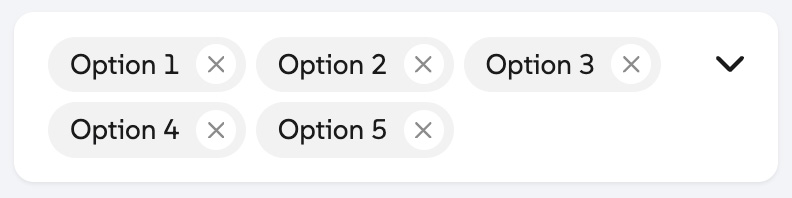
The style of the selected option labels that show within the select handle when multiple selection is enabled. The following values are supported:
-
tag-summary: Displays each selected option label as non-removable tags all on one line without wrapping. A count of how many options are selected is also shown.

-
removable-tags: Displays each selected option label as removable tags that wrap to the next line.
Clear-all Button
Attribute: data-clearable | Type: boolean | Default: false | Optional
Whether to show a clear-all button that removes all selected options when pressed.
Dropdown Arrow
Attribute: data-show-arrow | Type: boolean | Default: true | Optional
Whether to show an arrow icon within the select handle.
Search
Enable Search
Attribute: data-searchable | Type: boolean | Default: false | Optional
Whether to show a search input to filter options by search terms.
No Search Results Text
Attribute: data-no-results-text | Type: string | Default: No results found | Optional
The text to show when no options match the search terms.
Element Attributes
Wrapper Attributes
Attribute: data-wrapper-* | Optional
HTML attributes that should be added to the wrapper’s DIV element, prefixed with “data-wrapper-”. Example: data-wrapper-id, data-wrapper-class, etc.
Select Attributes
Attribute: data-select-* | Optional
HTML attributes that should be added to the <select> element, prefixed with “data-select-”, excluding data-select-multiple, data-select-value, and data-select-tabindex.
Search Input Attributes
Attribute: data-search-input-* | Optional
HTML attributes that should be added to the search input element, prefixed with “data-search-input-”, excluding data-search-input-value and data-search-input-tabindex.
Dropdown Preferred Width
Attribute: data-dropdown-preferred-width | Type: number | Default: 100 | Optional
The preferred width of the dropdown element.
Dropdown Max Height
Attribute: data-dropdown-max-height | Type: number | Default: 350 | Optional
The max height of the dropdown element.
Using Custom SVG Icons
Property: data-use-custom-icons | Type: boolean | Default: false | Optional
If true, you’ll be able to use your own custom icons for the select component instead of the default icons. Edit the code below by replacing the contents of each <symbol> element, then add the HTML to the DOM.
<svg id="cs-icons" style="display:none">
  <defs>
    <symbol id="cs-checkmark">
      <path d="M438.6 105.4c12.5 12.5 12.5 32.8 0 45.3l-256 256c-12.5 12.5-32.8 12.5-45.3 0l-128-128c-12.5-12.5-12.5-32.8 0-45.3s32.8-12.5 45.3 0L160 338.7 393.4 105.4c12.5-12.5 32.8-12.5 45.3 0z"></path>
    </symbol>
    <symbol id="cs-xmark">
      <path d="M393.47,9.38c12.5-12.5,32.8-12.5,45.3,0s12.5,32.8,0,45.3l-169.4,169.3,169.3,169.4c12.5,12.5,12.5,32.8,0,45.3s-32.8,12.5-45.3,0l-169.3-169.4L54.67,438.58c-12.5,12.5-32.8,12.5-45.3,0s-12.5-32.8,0-45.3l169.4-169.3L9.48,54.57C-3.02,42.07-3.02,21.88,9.48,9.38c12.5-12.5,32.8-12.5,45.3,0l169.3,169.3L393.47,9.38Z"></path>
    </symbol>
    <symbol id="cs-magnifying-glass">
      <path d="M416 208c0 45.9-14.9 88.3-40 122.7L502.6 457.4c12.5 12.5 12.5 32.8 0 45.3s-32.8 12.5-45.3 0L330.7 376c-34.4 25.2-76.8 40-122.7 40C93.1 416 0 322.9 0 208S93.1 0 208 0S416 93.1 416 208zM208 352a144 144 0 1 0 0-288 144 144 0 1 0 0 288z"></path>
    </symbol>
    <symbol id="cs-chevron-down">
      <path d="M201.475,246.675c12.5,12.5,32.8,12.5,45.3,0L438.775,54.675c12.5-12.5,12.5-32.8,0-45.3s-32.8-12.5-45.3,0l-169.4,169.4L54.675,9.475C42.175-3.025,21.875-3.025,9.375,9.475s-12.5,32.8,0,45.3l192,192,.1-.1Z"></path>
    </symbol>
  </defs>
</svg>